


Online Banking – CUBE
12/18(日) 系統維護
CUBE 網銀(含 App)、KOKO App 預計於 2023/12/18(日) 00:00~09:00 進行系統維護作業。維護期間 CUBE 網銀(含 App) 及 KOKO 將暫停服務。
如作業順利完成,將提前開放服務,如有特殊情況發生,可能延長原訂時間,造成您的不便,敬請見諒。
Reminder
QR Code Login
-
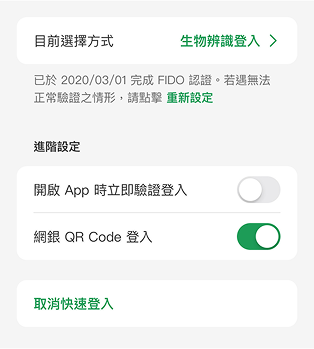
For first-time users, please log in to the CUBE App and enable "QR Code Login" under: More > Settings > General Settings > Quick Login.
-
Before Login
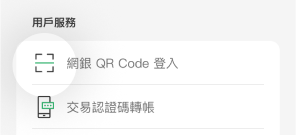
Tap the hamburger icon on the left
 and select "QR Code Login".
orAfter Login
and select "QR Code Login".
orAfter Login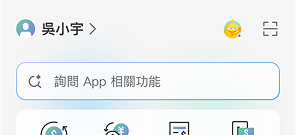
From the Account Overview page, tap the scan icon.

-

Fingerprint Recognition
or
Facial Recognition
After scanning the QR code, please complete biometric authentication to return to CUBE Online Banking.
Apply/ Reset Password
I Have a Deposit Account
Holds TWD accounts opened at a branch or online
I Don't Have a Deposit Account
Holds only credit cards
The maintenance might take longer than expected due to special circumstances. Your understanding is highly appreciated.
The maintenance might take longer than expected due to special circumstances. Your understanding is highly appreciated.
Reminder
You may have already logged in from another browser or device, or you may have not logged out properly from your last session. Please tap "Log Out" before retrying.
Reminder
You will leave our official website and go to an external website
貼心提醒
貼心提醒
Please download ATM card reader software
| NO | Version | Description | Download |
|---|---|---|---|
| 1 | 1.0.26.10 |
安控元件版本: 1.0.0.21 安控服務版本: 1.0.19.9 |
貼心提醒
Please download ATM card reader software
| NO | Version | Description | Download |
|---|---|---|---|
| 1 | 1.0.3.21 |
安控元件版本: 1.0.11 安控服務版本: 1.0.10 |
貼心提醒
親愛的客戶 您好:
為了提供您最佳的瀏覽體驗,本行將不再支援IE11(含)以下的瀏覽器,建議您選用其他瀏覽器。
※ 提醒您:微軟於2022 年 6 月 15 日 起,某些 Windows 10 版本不再支援 Internet Explorer 11 傳統型應用程式, 詳情請見《微軟停止支援公告》